How Small Businesses Can Use AI Without Creating Security Risks
AI tools are now part of everyday work. Staff use them to draft emails, summarise documents, write code, analyse spreadsheets and answer customer questions. For a small business, that can mean real time savings and a genuine competitive edge.
But every time an employee pastes something into an AI tool, company data leaves your systems. If nobody has decided what is allowed, that is happening right now, without any rules, and probably without your knowledge.
The answer isn’t to ban AI. It’s to introduce it deliberately. Here are the main risks, and a practical way to adopt AI safely.
The Three Risks Most Businesses Overlook
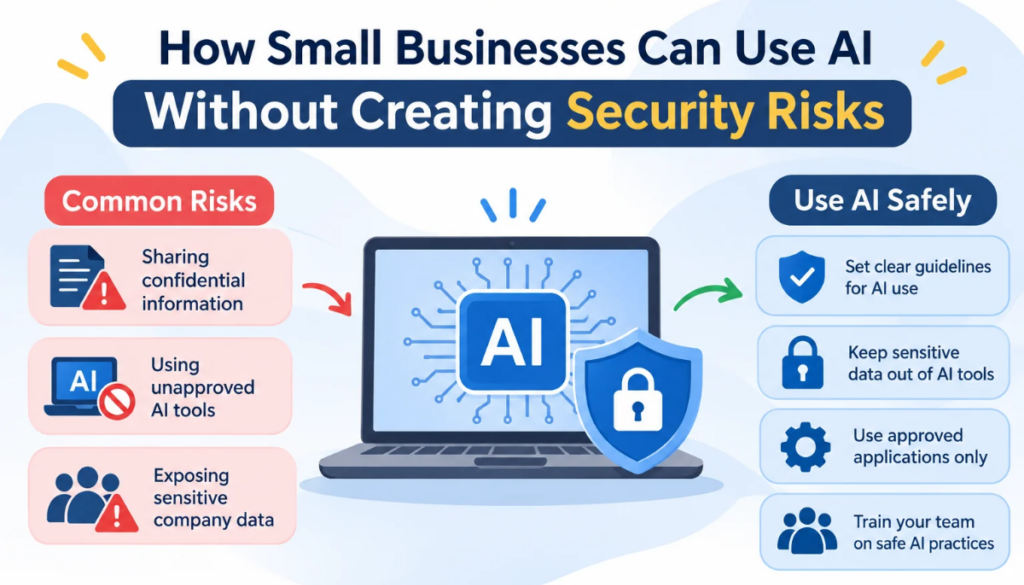
- Confidential Information Going Into AI Tools
It usually starts innocently. An employee wants a quick summary of a client contract, help with a tricky customer complaint, or a formula fixed in a payroll spreadsheet. They paste the content into a chatbot and get a helpful answer.
The problem is what was just shared: client names, pricing, financial figures, staff details, passwords, or internal strategy. Depending on the tool and its settings, that information may be stored, reviewed by the provider, or even used to improve the service. Once it has left your control, you can’t easily get it back.
There is also a legal side. If personal data is involved, sharing it with an unapproved third party can put you in breach of data protection rules such as UK GDPR, as well as your contracts with clients.
- Unapproved Apps and “Shadow AI”
New AI tools appear every week, and many are free and take seconds to sign up for. Employees try them out of curiosity or to get work done faster. This is often called shadow AI, the AI equivalent of shadow IT.
The risks include:
- Unknown data handling. You don’t know where data is stored, who can see it, or how long it is kept.
- Weak security. Small or new providers may lack basic protections, and some are simply not trustworthy.
- Fake and malicious apps. Attackers publish look-alike AI apps and browser extensions designed to steal data or credentials.
- Risky permissions. Some tools ask for access to email, calendars or files, and one careless click can hand over a lot.
- No visibility. If IT doesn’t know a tool is in use, it can’t be secured, monitored or switched off.
- Sharing Sensitive Company Data Through Connected Tools
AI is increasingly built into the software you already use, from email and document tools to meeting assistants and customer systems. Some assistants can search across your files, mailboxes and chats to answer questions.
That is powerful, but it also exposes existing problems. If your permissions are messy, so that too many people can access too many files, an AI assistant can surface information to people who should never see it. Staff may also share AI-generated answers or meeting summaries containing sensitive details without realising it.
And don’t forget accuracy. AI can sound confident while being wrong. Sending unchecked AI output to a client or acting on it in a business decision is a risk in itself.
How to Introduce AI Safely: 7 Practical Steps
- Decide What You Want AI to Do
Start with the business goal, not the tool. Pick a few clear use cases, such as drafting marketing copy, summarising meetings or speeding up research, and judge tools against those.
- Write a Simple AI Acceptable Use Policy
You don’t need a 40-page document. One or two pages that staff will actually read is far better. It should cover:
- Which AI tools are approved, and for what purposes
- What must never be entered into AI tools, such as client data, personal data, financial records, passwords, and confidential contracts
- Whether personal AI accounts may be used for work (usually they shouldn’t be)
- The requirement to review and fact-check AI output before it is used or sent
- Who to ask if someone isn’t sure
- Choose Business-Grade Tools
Free consumer tools and business plans are often very different when it comes to privacy. When comparing options, check:
- Is your data used to train the provider’s models, and can you opt out or is it off by default?
- Where is data stored, and for how long?
- Does the tool offer single sign-on, MFA, admin controls and audit logs?
- Does the provider publish clear security certifications and data protection terms?
If you already use Microsoft 365 or Google Workspace, their built-in AI options may fit within controls you already have.
- Classify Your Data
Staff need to know what counts as sensitive. A simple three-level scheme is enough: public, internal and confidential. Make it clear that confidential information stays out of unapproved tools, and that some data, like passwords and payment details, should never be put into any AI tool at all.
- Fix Access and Permissions First
Before switching on AI assistants that can search your company data, review who can access what. Apply least-privilege access, tidy up overshared files and folders, and make sure sensitive sites are properly restricted. AI will respect your permissions, so make sure they are right.
- Put Technical Controls in Place
Policy alone isn’t enough. Back it up with controls such as:
- Enforced MFA and single sign-on for approved AI tools
- Blocking or restricting unapproved AI sites and browser extensions
- Controls on which apps users can authorise to access company data
- Data loss prevention rules to flag or stop sensitive data being shared
- Managed, up-to-date and protected devices
- Train Your People and Review Regularly
Most incidents come from well-meaning staff, not bad actors. Run a short briefing with real examples, such as “Here’s what happens when you paste a client contract into a chatbot.” Encourage questions, and make it easy to ask for a new tool to be approved rather than quietly using it. Then review your approved list and policy every few months, because the AI landscape changes quickly.
A Quick Self-Check
Ask yourself:
- Do we know which AI tools our staff are using today?
- Do our people know what they can and can’t share with them?
- Have we got an approved, business-grade option for them to use instead?
- Are our permissions and data in good enough shape for AI to be switched on safely?
- If someone did leak sensitive data into an AI tool, would we know what to do?
If you answered “no” or “not sure” to any of these, you are not alone, and it is fixable.
How RINCS IT Can Help
AI should help your business grow, not expose it. RINCS IT helps small businesses adopt AI responsibly, from reviewing the tools already in use and writing a clear usage policy to tightening Microsoft 365 permissions, setting up security controls and training your team.
Want to use AI with confidence? Get in touch with RINCS IT for an AI readiness and security review.